
AI Code Writer for Beginners: How to Learn to Code Faster (Without Cutting Corners)
Starting to code is less lonely when you have a patient helper on call. An ai code writer is an AI tool that turns plain-English instructions into working code — and for a beginner, that same tool can generate small examples, explain what each line does, and fix the errors that usually make newcomers quit.

Used well, it does not replace learning to program — start with a solid path like the official Python Beginner’s Guide — it speeds it up. Used badly, it becomes a crutch. This guide shows the difference.
What Is an AI Code Writer, and How Does It Work for Beginners?
An AI code writer (also called an AI code generator or AI coding assistant) reads a natural-language prompt like «write a function that checks if a number is even» and returns runnable code. Under the hood it runs on a large language model — a system trained on huge amounts of text and code so it can predict and generate the next plausible piece of output, the same kind of AI behind ChatGPT, Gemini, and Claude. Typical tools support Python, JavaScript, HTML/CSS, Java, C++, and SQL, so a beginner can experiment in whatever language their course uses.
From plain English to working code
You describe the goal, not the syntax. Instead of memorizing exact loop structure or method names on day one, a beginner can write «make a list of the first ten square numbers» and study the working result, then look up any part that isn’t clear. That lowers the barrier to a first working program considerably.
Why beginners are adopting it fast
Coding assistants are now mainstream, not niche: in Stack Overflow’s 2023 developer survey, 70% of developers reported using or planning to use AI tools, and those still learning to code were even more likely to say so. For a beginner, that means asking an assistant for a first draft, an explanation, or a fix is now a normal part of learning — not a shortcut around it.
| Signal | What it means for a beginner |
|---|---|
| 70% of developers use or plan to use AI coding tools | The skill of prompting an assistant is now a normal part of learning to code, not a shortcut around it |
| Support for Python, JavaScript, HTML/CSS, Java, C++, SQL | Works alongside almost any first course or bootcamp curriculum |
| Free tiers on most major tools | No cost barrier to trying it before committing to a paid plan |
What Can a Beginner Actually Use It For?
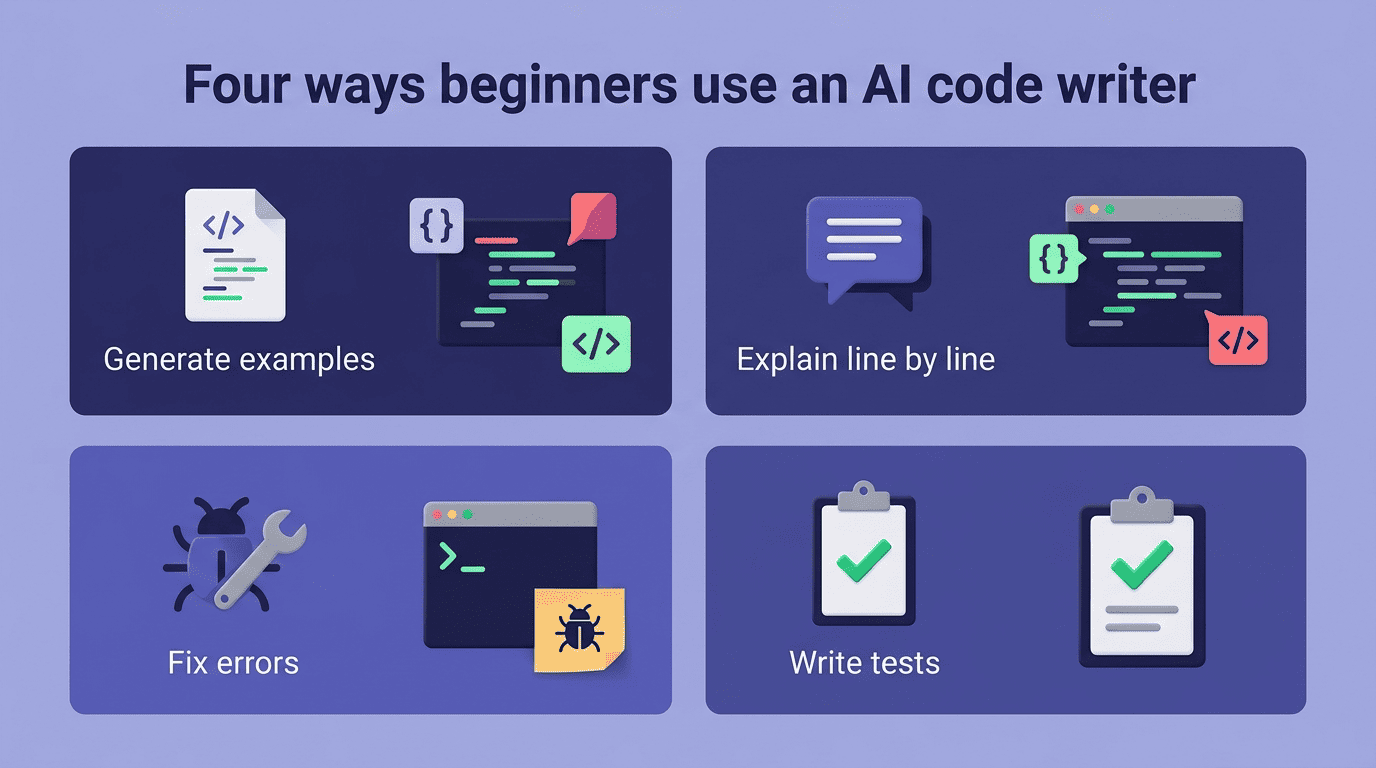
An AI code writer for beginners is not just an autocomplete — it can generate, explain, debug, and tidy up code, and each of those is a different learning tool.
1. Generate simple examples to learn from
Ask for a tiny, self-contained example — a calculator, a to-do list, a function that reverses a string — and study the result line by line rather than copying it into a bigger project. Good beginner prompts to try:
- «Write a Python function that counts the vowels in a string.»
- «Build a simple JavaScript to-do list with add and delete buttons.»
- «Show me a basic calculator that handles addition and subtraction.»
- «Write a function that checks whether a word is a palindrome.»
2. Explain concepts and code line by line
This is the most underrated use. Paste code you don’t understand and ask «explain this line by line, like I’m new.» As Microsoft frames it in its own guidance on learning to code with an assistant:
You’re not just using AI to write code — you’re learning how and why the code works.
Microsoft
That framing matters because it turns the assistant from an answer machine into a tutor. Asking «why» after every generated snippet is the single habit that separates a beginner who is learning from one who is just collecting code that runs.
3. Fix the beginner errors that make people quit
Paste an error message and ask what it means and how to fix it. The assistant translates cryptic messages into plain language, which is exactly the wall that makes many newcomers give up in the first week. Instead of guessing at a missing colon or a mismatched bracket, you get a plain-language reason and a corrected line. A few errors nearly every beginner hits early on:
SyntaxError— a typo, a missing colon, or a mismatched bracketIndexError— trying to access a list position that doesn’t existNameError— using a variable before it’s defined or misspelling its nameTypeError— mixing incompatible types, like adding a number to text
4. Write tests and tidy up code
Once something works, ask for a simple unit test or a cleaner version of the same function, known as refactoring. Seeing the «before and after» side by side teaches good structure faster than reading a textbook chapter on style, because the example is your own code.
How to Write a Good Prompt as a Beginner
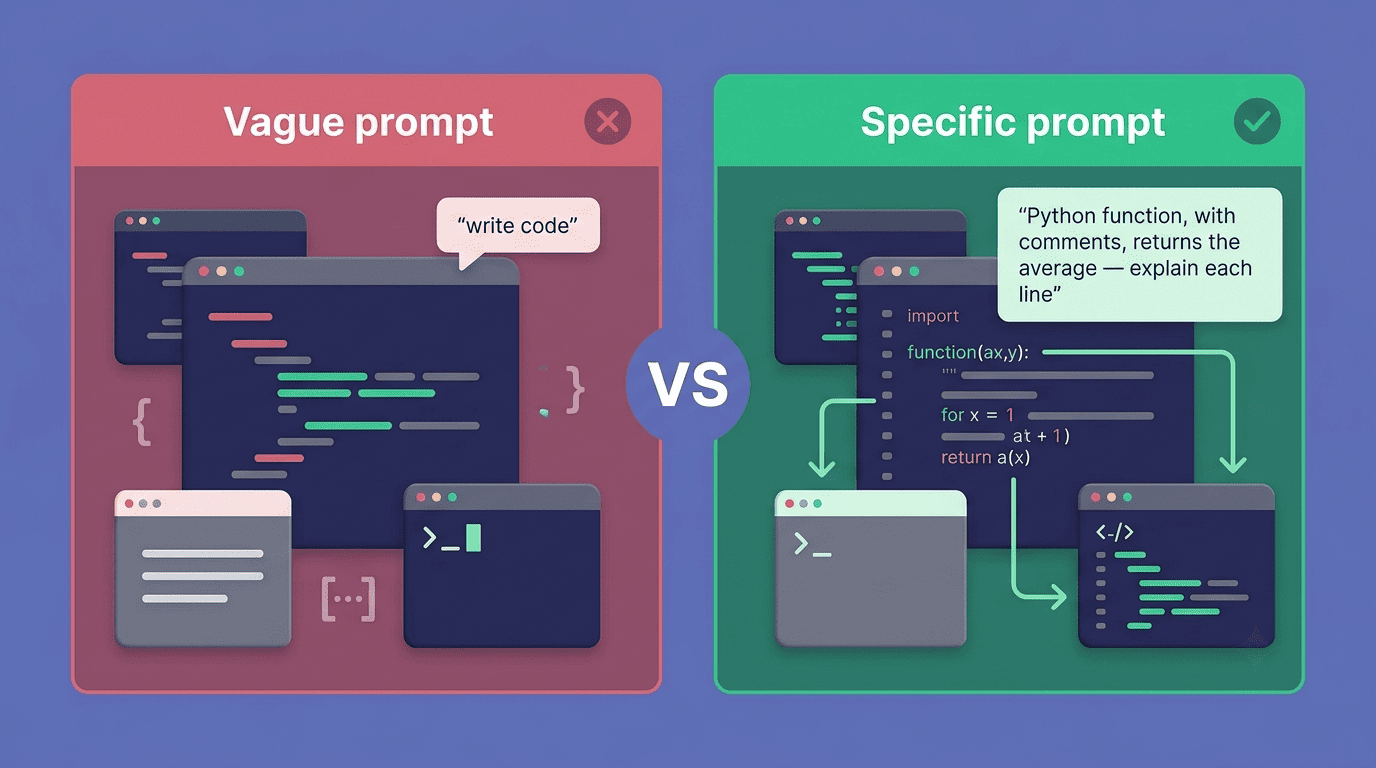
A weak prompt gets a generic answer. A specific one gets code you can actually learn from and reuse.
Be specific, name the language, ask for comments. «Write code» is a weak prompt. «Write a Python function, with comments, that takes a list of numbers and returns the average — explain each line» is a strong one. State the language, the input, the output, and ask for comments and an explanation in the same request.
Iterate instead of restarting. If the first answer isn’t right, refine it: «make it simpler,» «it crashes on an empty list — fix that.» Treat the exchange as a conversation, not a vending machine where you throw away a bad result and start over. For the fundamentals behind why a fix works, a structured lesson like freeCodeCamp’s curriculum fills in the gaps an AI answer alone won’t cover.
Give it context, not just the task. Mention your skill level and what you already tried — «I’m a beginner, I tried a for-loop but got an off-by-one error» — so the explanation matches where you actually are, not where a generic tutorial assumes you are.
Your First Project With an AI Code Writer (Step by Step)
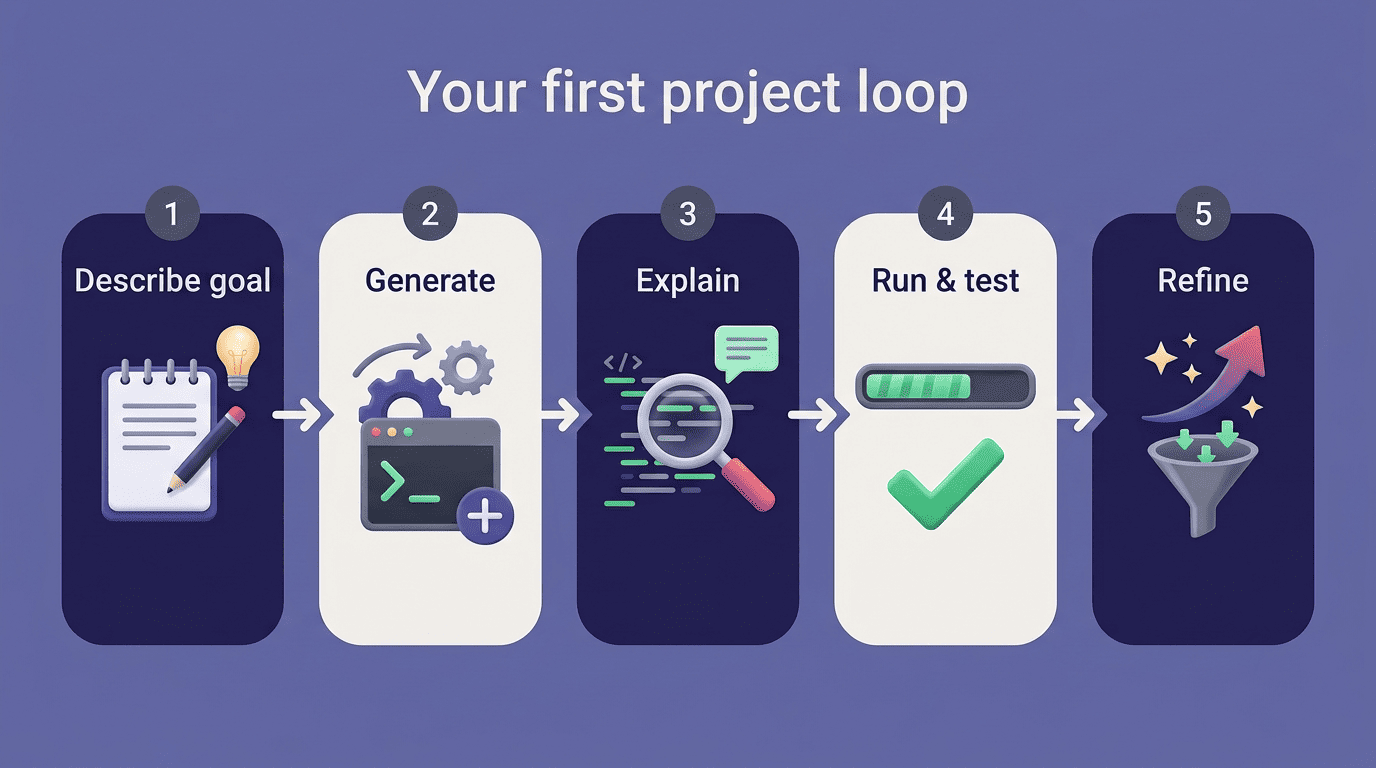
A five-step loop a beginner can repeat on any small project:
- Describe the goal in plain language — what should the program do, given what input?
- Let the AI code writer generate a first version.
- Read it and ask it to explain anything unclear before moving on.
- Run it yourself and note exactly what breaks or looks wrong.
- Feed the error or the unexpected result back and ask for a fix.
Type the code yourself or at minimum read every line before running it — never paste-and-run blindly, especially on anything that touches files, a network request, or real data. This loop works the same way on a second, third, and tenth small project, which is exactly how you turn an ai code writer for beginners into a repeatable study habit instead of a one-off trick.
Avoiding Over-Reliance: Build Understanding, Not a Crutch
The habit that determines whether an AI code writer helps or hurts a beginner is what happens after the code appears on screen.
Always review, run, and test what the AI writes
An AI code writer can be confidently wrong. Microsoft’s own guidance is to review and test AI-generated code before trusting it, not to accept it on faith because it compiles or runs once. Make «can I explain this to someone else?» the bar before you keep any snippet in a real project.
Keep learning the fundamentals yourself
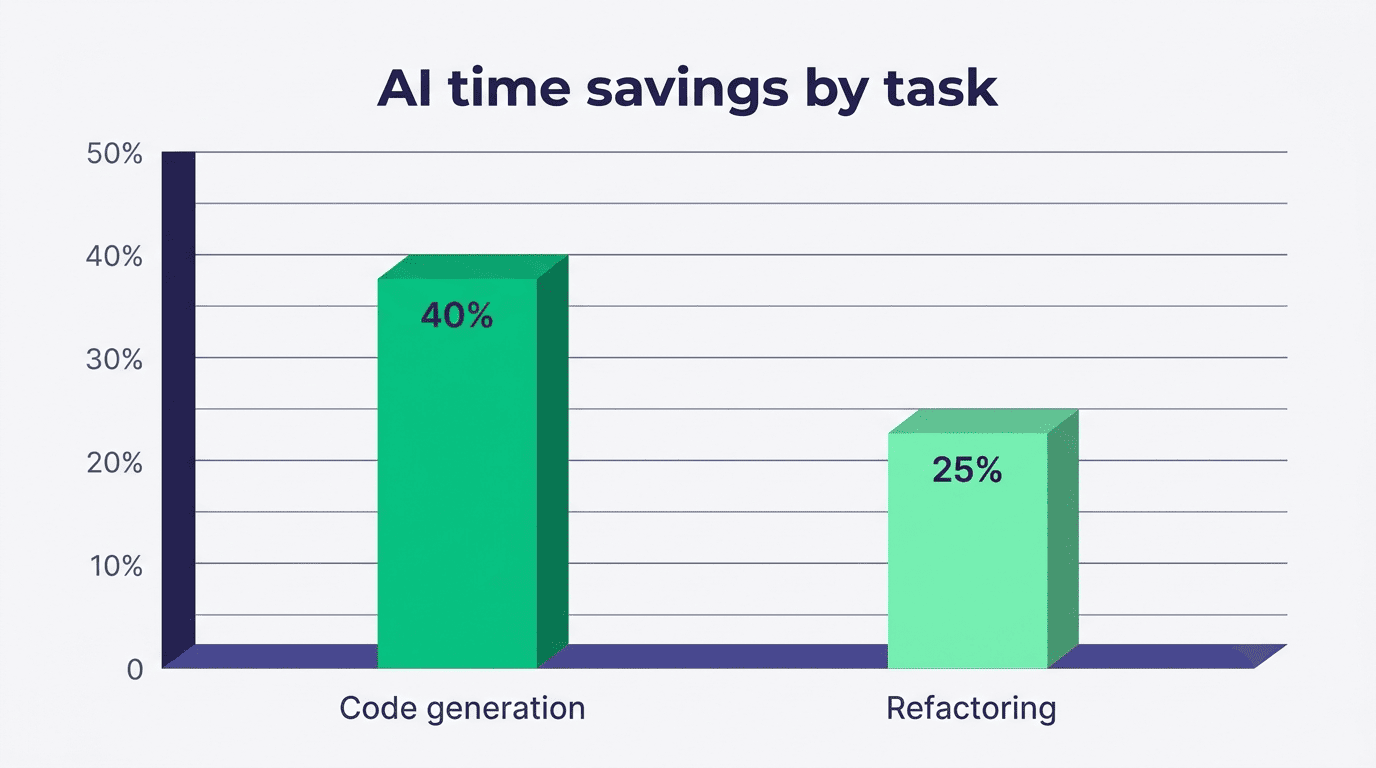
McKinsey’s research with professional developers found generative AI tools could cut time spent on some tasks by roughly 35-45% for code generation and 20-30% for refactoring, but the responsibility for correct, secure code stays with the human who ships it. Pair the assistant with a real curriculum — freeCodeCamp, MDN’s learning area, or your course — so the AI accelerates the learning instead of quietly replacing it.
A short checklist for staying in the driver’s seat while you use the assistant:
- Ask «why does this work?» before moving to the next line
- Type at least the tricky parts yourself instead of only pasting
- Keep a running list of concepts you looked up, and revisit them later
- Try to solve a simplified version of the problem without AI first
Good Habits and Common Beginner Mistakes
Below is a quick comparison of the habit that builds skill against the mistake that just produces working-looking code.
| Habit that builds skill | Mistake that undermines it |
|---|---|
| Ask «explain this line by line» after every snippet | Copy-paste code you cannot read or explain |
| Start with tiny, single-purpose programs | Jump straight into a large, unfamiliar project |
| Read the code before you run it | Paste-and-run blindly, including on data or files |
| Rewrite the AI’s answer in your own words afterward | Trust the first answer without testing edge cases |
| Use specific, detailed prompts | Use vague prompts like «write code» with no context |
Reviewers frequently point to readability as a differentiator among tools, though opinions vary by tool and update — Amazon Q Developer (the AWS coding assistant formerly known as CodeWhisperer), for example, gets credit in some reviews for clean, AWS-aware suggestions, while others note its output can be too generic for a beginner without guidance — but the habit of reading and questioning what you get matters far more than which specific tool you pick.